
Create a Wallet
Understand creation versus import and prepare a safe backup environment.
Learn more →imtoken
A multi-chain wallet, blockchain network and Web3 knowledge hub from imtoken
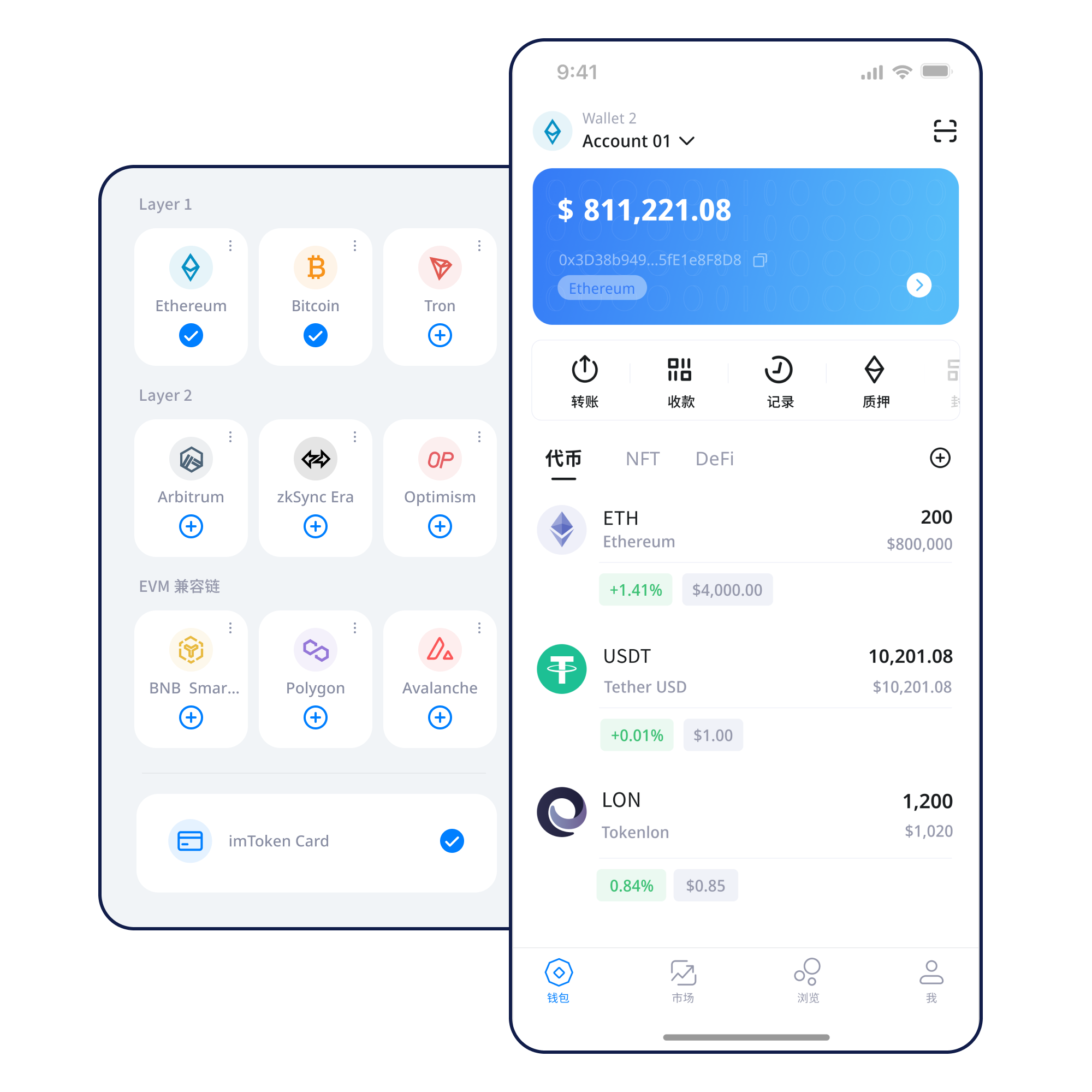
Learn multi-chain assets, network selection, sending and receiving, DApp connections, token approvals and wallet security through a clear workflow. imtoken emphasizes what to verify before a signature, approval or transaction so users can make decisions with better context.
Start with a task
Understand creation versus import and prepare a safe backup environment.
Learn more →Keep the seed phrase offline and out of screenshots, chats and cloud documents.
Learn more →Check the receiving address, target network and asset type together.
Learn more →Review the address, network, amount and gas, then verify the transaction hash.
Learn more →Verify the domain, then review connection, signature and approval requests separately.
Learn more →
Wallet capability
Treat every balance as belonging to a specific network. Check the network, destination and confirmation state before moving assets between accounts or services.
Review the address, network, amount, gas and transaction hash as one sequence.
Open guide →Mobile access for asset views, network management, transaction history and DApp requests.
Understand browser connections, account requests, approvals and when to disconnect.
Web guidance →
Keep seed phrases and private keys offline. Review every approval independently.
A familiar address format or token name does not guarantee that two networks are compatible. Verify the intended chain and recipient support before sending.
Use block height and transaction status to understand where a broadcast transaction sits in the public ledger.
Gas assets, explorers, contracts and network parameters can differ even when networks share an EVM-compatible execution model.
Bridging or withdrawing may involve separate contracts, confirmation stages and waiting periods. Read the route before moving assets.
Fees can change with network state and transaction complexity. Confirmation time should be evaluated together with the chosen fee and current network load.
Learn gas and confirmations →Wallet journey
Use the official download entry and review the environment before installation.
Know whether you are generating new keys or restoring existing ones.
Keep seed phrases offline and never send private keys to anyone.
Confirm the intended network, gas asset and recipient support.
Check the address, network and amount before broadcasting.
Verify transaction hashes and remove permissions you no longer need.
Web3 & DApp
Connecting a wallet does not mean you should accept every later signature or approval. Read each request in the context of the domain, account, network and permission scope.
Open Web3 guide →Security
Seed phrases and private keys remain under the user’s control. imtoken personnel will never ask for them. Security also depends on the device, network, destination address, DApp domain, signing message and approval scope. On-chain transactions are generally not reversible by the wallet alone, so the strongest protection is a repeatable review process before acting.
Open Security Center →Academy
Start with addresses, seed phrases, private keys, networks, gas and transaction hashes. Then move on to DApps and approvals. This order helps you understand what a wallet request means before you authorize it.
Read the starter guide →How nodes and blocks produce verifiable transaction state.
EVMEVM and smart contractsAddresses, gas, tokens and contract execution.
Layer2Layer 2 basicsBase networks, bridges and cross-layer movement.
DAppToken approvalsTargets, allowances and permission cleanup.
SecurityWallet securityKey protection, phishing and transaction checks.
GlossaryBlockchain glossaryA practical reference for recurring wallet terms.
Ethereum & PoS
Proof of stake uses validators to help secure the network. Rewards come from protocol activity and can change. Withdrawals and exits may involve queues, while validator performance and protocol rules can affect outcomes.
Learn Ethereum staking →FAQ
A digital wallet typically manages keys and helps you view addresses, assets and on-chain transactions. The assets themselves are recorded on the relevant blockchain rather than stored as a balance inside a webpage.
A seed phrase can usually derive a set of wallet keys, while a private key directly controls a corresponding address. Both are highly sensitive and should never be sent through chat, forms or screenshots.
The same asset name may exist on multiple networks, and the recipient must support the network you choose. Checking the address without checking the network can still result in a serious transfer mistake.
Gas is the fee mechanism used to execute transactions or contract calls on a blockchain. The actual cost depends on network rules, transaction complexity and congestion.
A transaction hash is a unique identifier that lets you inspect status, block height, confirmation count and related addresses in a block explorer.
An account connection by itself usually does not transfer assets, but later signatures, approvals or transactions can create permissions or move value. Review every request separately.
imtoken
Use the official download entry, then build your setup around offline backups, network checks and independent review of every signature or approval.